Understanding Drama-Otaku’s Site Structure (semi-outdated)
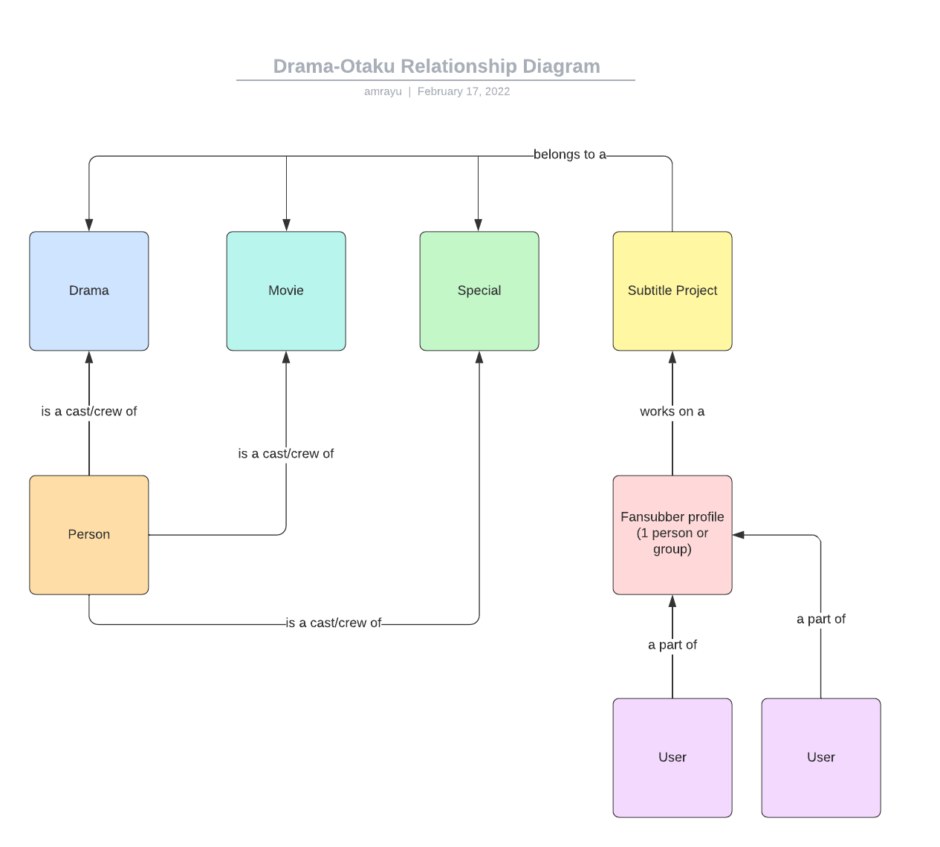
General
Any page type can be created at any time, but to get the most out of the site, please add related Dramas, Movies, SPs at the bare minimum.
The tutorials listed below are for Contributors only.
- Adding a Drama, Movie or Special
- Adding Cast to a Drama, Movie or Special
- Adding a Person
- Adding a Fansubber
- Content Guide for Fansubbers
Guides and Tutorials
Frequently Asked Questions (FAQs)
When is Drama-Otaku registration open?
Once at the start of every season. Registrations usually last 3-5 days.
Check the What’s the Registration Process FAQ below for more details.
How do I use this site?
Follow the Starter Guide.
My account says its locked and I can’t login?
Accounts are routinely set to an “Inactive” state if you don’t login for 6 months to a year.
Open up a Discord ticket to directly chat with staff to discuss.
You will be asked for the following in order for us to help you over Discord:
- Username
- Registered email (on the site)
- Fave Jdrama (title)
If you do not remember one of the parameters above, we won’t be able to help you over Discord due to security reasons. Instead email us using the registered email with what you remember using the details below:
- Subject Line: “Drama-Otaku.com Account Locked”
- Email: [email protected]
- Body:
- Username
- Registered email (on the site)
- Fave Jdrama (title)<– if you can’t remember this, that’s fine.
How can I contact Drama-Otaku staff?
Visit the Contact page (under the nav Help > Contact).
What are the Drama-Otaku rules?
The Rules
- By using the site, you agree you won’t reshare/rehost any files and links found on the site.
- Do NOT share your account!
- Do not re-translate, machine translate without the expressed permission from the original Subtitle Provider.
- Exception #1: You can rehost fansubbed videos if hardsubbing using Drama Club RAWs, but please credit us accordingly.
- Exception #2: You can re-translate from Japanese subtitles, but please direct users to Drama-Otaku if using Drama Club RAWs.
- Do not use the comments section to request or ask about subtitles, RAWs, files or links.
- Also be kind! No bashing and rude comments that can discourage, offend or hurt fansubbers and other users.
Offenders will be banned.
Why wasn’t my account approved?
Private credential – we can’t access it, so how can we validate it?
Empty credential – how can we validate who you are if the account is empty?
New credential – account is too new to validate
Invalid credential – some people literally put any link, ie. twitter.com or mydramalist.com
Suspicious credential – If your account is filled with random retweets of NFTs and Bitcoin scams, yes, this is suspicious. Anything else that seems “off” is deemed suspicious.
Drama-Otaku account exists (duplicate) – An account using the same credential exists already. Please use the original account and do not create multiple accounts.
What is the registration process?
- Wait for an open registration period (follow us on Twitter, Discord, or get notified via email).
- Once registration is open, take the registration quiz and provide the necessary requirements.
- Wait for Staff to close the registration and for Staff to review your application (ETA 1~2 weeks).
- Once approved, you’ll get an email invite to register directly on the site.
- The email invite is only good for 7 days.
- Check your junk inbox.
- Click the link in the email, enter all the details, and submit.
- Register with the email that you used in the registration quiz.
- Login and start using the site!
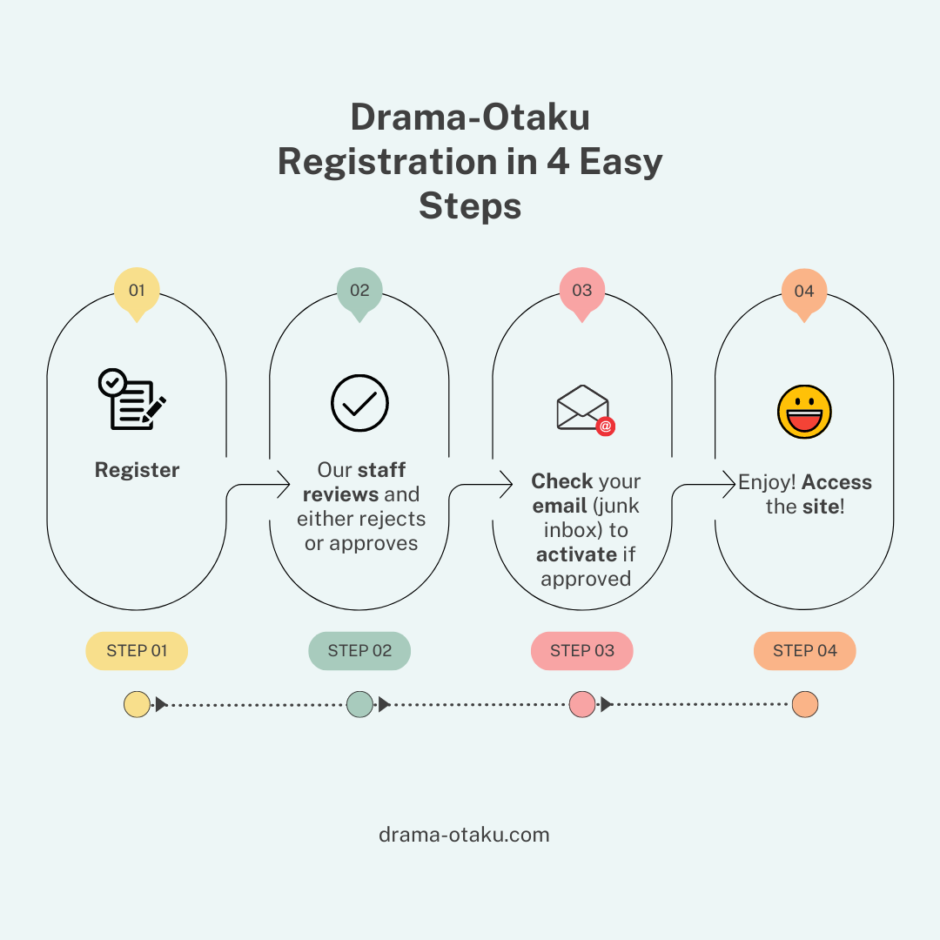
We’ve also created this diagram!
Is my account activated?
- First make sure you’re logged into the site. (Don’t remember your login, password or email? Go to the next section below.)
Where is the Approval email?
You have three options:
- Check your junk inbox
- Ask our staff to resend the Approval email
- Ask our staff to Activate the account instead (you’ll need a temp password from our staff as well)
I didn’t receive an approval or rejection email. How can I check my registration status?
Follow the instructions in the FAQ below to open up a Discord ticket to chat with Staff.
What if I don’t remember my login, password or email?
- Visit Discord via the #general channel.
- Click and check the pinned messages in the channel
- Click JUMP to go to the FORMS > Drama-Otaku.com Password Reset
- Click on the TICKET button and a pop-up will appear
- Fill in the following 3 fields
- Registered Username
- Registered Email
- Registered Favorite Jdrama (that you listed on your registration)
- Hit the SUBMIT button
- A direct message will be created with yourself and Staff and the following will occur:
- The details of the ticket will be verified
- We’ll reset and give you a temp password in the direct message
- If there’s any issues, we will ask them in the direct message – you have 24 hours to respond
- Try to login with your Registered Username and the new temp password
- Confirm with us that everything works within 24 hours, so we can close out the ticket
- Follow the rules on this Starter Guide and reset your temp password if you’d like
- Staff will close out the ticket
- If you still have issues after the ticket is closed, repeat step 1 above and file another ticket in Discord
I reset my password, but didn’t receive the email. What should I do?
File a Discord ticket in the #general channel.
You can find the ticket form under pinned messages in the #help-and-support channel.
Check What if I don’t remember my login, password or email? for more details.
Why can’t I access the site? My account was approved/activated.
– You can file a Discord ticket following instructions under What if I don’t remember my login, password or email? so staff can check.
– Your account was banned because you broke one of the rules.
Where is [insert Drama, Movie, Special, Person, etc.] in the Search Results?
– The title may not exist.
– The title was newly created and needs to be indexed by our Search.
I can’t see subtitles. How can I download subtitles?
– Make sure your browser is updated.
– Recommended browsers: Chrome, Firefox and Safari.
– Make sure that you’re logged into the site.
How can I watch [insert Drama, Movie, Special, etc.]?
– Check the relevant Drama, Movie or Special page for a special green button labeled, “Pirate’s Booty,” under the featured poster image.
– Another option is to check the Pirate’s Booty page (in the nav it’s under Subtitles > Pirate’s Booty) which is updated daily.
– Warning: Not everything on the site has a Pirate’s Booty link.
Where do I find RAW video files?
There are many sites in the wilderness that you can access to download the video files. Check our useful guide here on some of the most common sites to download from.
How do I find subtitles?
Check this page out for the various ways to search for subtitles on the site.
How can I turn off ads and support a different way?
- Join one of the tiers on our Patreon.
- Send us a Patreon message with your Drama-Otaku.com username once you’ve confirmed your contribution.
- Once your Patreon contribution is verified by us, we’ll change your account role on Drama-Otaku.com so you can experience the site ad-free.
How can I support your site besides Patreon?
We accept one-time donations via Ko-fi.
You can also subscribe directly on the site by upgrading your account here.
How do I reset my password?
1. Login to the site
2. Hover over your profile icon then go to Settings
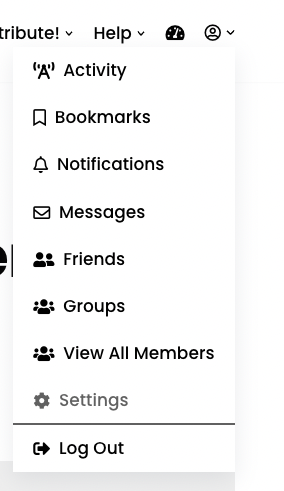
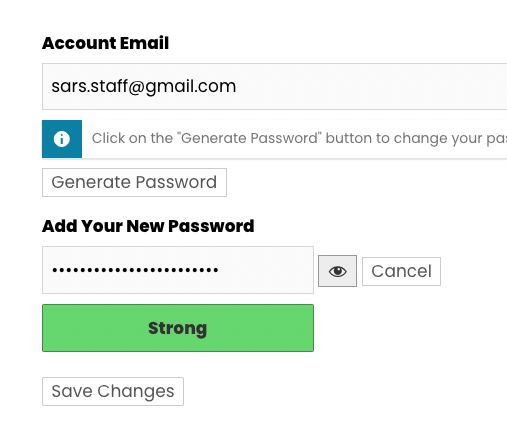
3. Under the General section, click on the Generate Password button
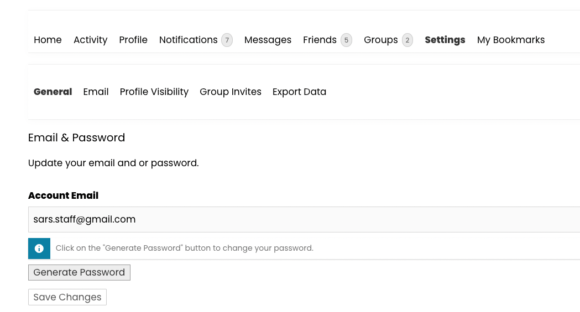
4. Fill in your password, then click Save Changes