Everything you need to manage your subscription, billing, and order history – all in one place.
Managing Your Subscription
How do I cancel my subscription?
You can cancel your subscription anytime from your account settings. Your access will continue until the end of your current billing period, and you won’t be charged again.
- Go to Dashboard
- Select “Subscriptions & Orders”
- Click “Cancel”
- Confirm your cancellation
You’ll receive a confirmation email once your cancellation is processed.
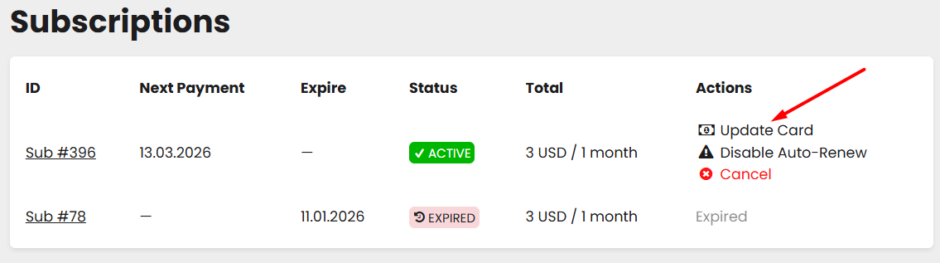
Tip: If you just want to stop future renewals but keep your access until the end of the current period, consider using Disable Auto-Renew instead of canceling outright.
How do I enable or disable auto-renewal?
You can control auto-renewal at any time from your account. When auto-renewal is disabled, your subscription stays active until the end of the current billing period – you just won’t be charged again automatically. You can re-enable it at any time before the period expires.
- Go to Dashboard
- Select “Subscriptions & Orders”
- Click “Disable Auto-Renew” or “Enable Auto-Renew”
- Confirm the action
You can also set this preference when first purchasing a subscription.
How do I change my subscription plan?
To switch to a different plan, cancel your current subscription and purchase a new one. Only one active subscription is supported per account.
When will I be charged for my subscription?
Your subscription renews automatically on the same date each billing period (monthly or annually, depending on your plan). You’ll receive a reminder email 7 days before each billing date.
You can view your next billing date anytime in Dashboard → Subscriptions & Orders.
Note on discounts: If you subscribed using a discount code, the discount applies to the first payment only. All subsequent renewals are charged at the standard plan price.
Order History
Where can I see my past orders?
All your orders are saved in your account for easy reference.
- Go to Dashboard
- Select “Subscriptions & Orders”
- Browse or search your past orders
Each order shows the date, items purchased, and amount paid.
I didn’t receive my order confirmation email
If you don’t see a confirmation email within a few minutes of placing your order:
- Check your spam or junk folder
- Verify the email address in your account settings is correct
- Look for the order in your Order History to confirm it went through
Still missing it? Contact us and we’ll resend your confirmation right away.
Payment & Billing Issues
What payment methods do you accept?
We accept all major credit and debit cards (Visa, Mastercard, American Express, Discover), PayPal, and Apple Pay.
Why was my payment declined?
Payment declines can happen for several reasons:
- Insufficient funds
- Incorrect card details (number, expiration date, CVV)
- Card expired
- Billing address doesn’t match the card
- Your bank flagged the transaction
To resolve this:
- Double-check your payment information in Dashboard → Subscriptions & Orders
- Try a different payment method
- Contact your bank if the issue persists
If you continue having trouble, reach out to us and we’ll help sort it out.
What happens if my renewal payment fails?
If an automatic renewal payment doesn’t go through, here’s what happens:
- You’ll receive an email with a link to complete the payment manually.
- If the payment is still not made, you’ll receive up to 3 reminder emails in total.
- If no payment is received after the final reminder, your subscription will be cancelled and your account downgraded automatically.
Please make sure to check your spam or junk folder – reminder emails can occasionally be filtered there. You can also check the payment status directly in Dashboard → Subscriptions & Orders and complete the payment from there.
How do I update my payment information?
Keeping your payment details current ensures uninterrupted access to your subscription.
- Go to Dashboard → Subscriptions & Orders
- Select the upcoming recurring order
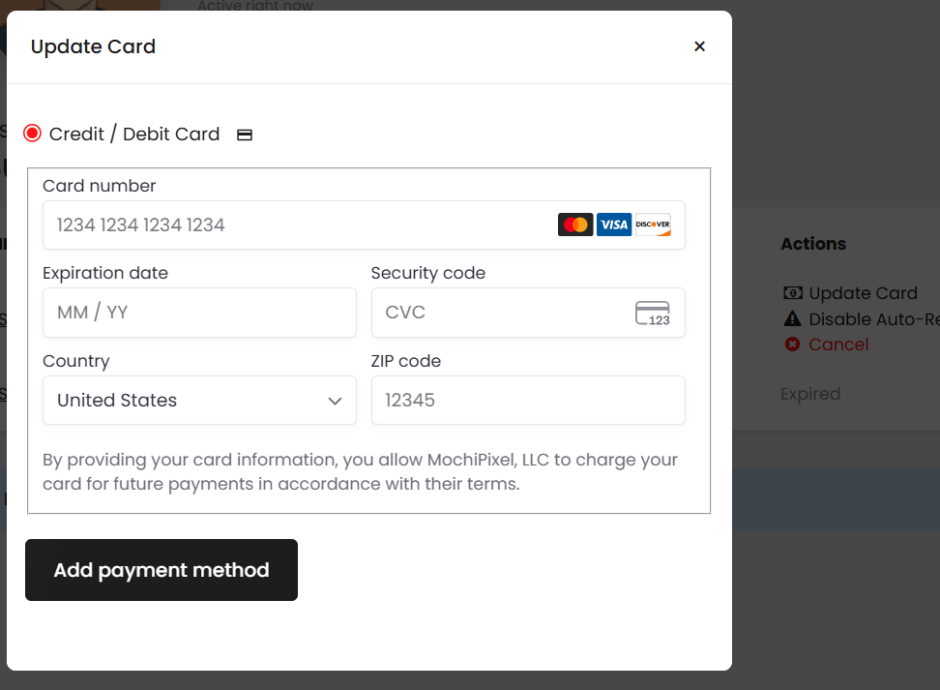
- Click “Update Card”
- Fill in your Credit/Debit Card information
- Save your changes by clicking “Add payment method”
I was charged twice / My charge looks incorrect
We’re sorry for any confusion! Most duplicate charges are temporary authorization holds that will drop off within 2–5 business days.
If you see a charge you don’t recognize:
- Check your Order History to match charges with purchases
- Look for the transaction in your email confirmations
- Verify the amount matches your subscription plan or recent order
If something still doesn’t look right, contact us with the charge details and we’ll investigate immediately.
Refunds & Credits
What is your refund policy?
We want you to love Drama-Otaku! If you’re not satisfied with your subscription, we offer refunds under these conditions:
- New subscribers: Full refund within 1 day of your first subscription payment
- Annual subscriptions: Prorated refund if you cancel within 30 days
- Technical issues: If you experienced service problems that prevented you from using the site, contact us and we’ll review your case
Refunds are not available for partial months of completed subscription periods.
How do I request a refund?
- Contact us with your account email and order details
- Let us know the reason for your refund request
- We’ll review your request within 2 business days
- If approved, refunds are processed within 5–10 business days
Refunds are issued to the original payment method used.
Do you offer account credits?
Yes! In some cases, we may offer account credits instead of refunds:
- Service disruptions or technical issues
- Billing errors on our end
- Exceptional circumstances
Credits are automatically applied to your account and can be used toward future downloads.
I was charged after canceling my subscription
This shouldn’t happen, and we apologize if it did. This can occur if:
- You canceled after your renewal date for that billing cycle
- The cancellation didn’t process properly
Contact us right away with your cancellation date and charge details. We’ll investigate and issue a refund if appropriate.
Still Need Help?
Can’t find what you’re looking for? We’re here to help!
Contact us at: [email protected]
Response time: We typically respond within 24 hours
Thank you for being part of the Drama-Otaku community!
For fastest assistance, please include:
- Your account email address
- A description of the issue
- Any relevant order numbers or dates
- Screenshots if applicable